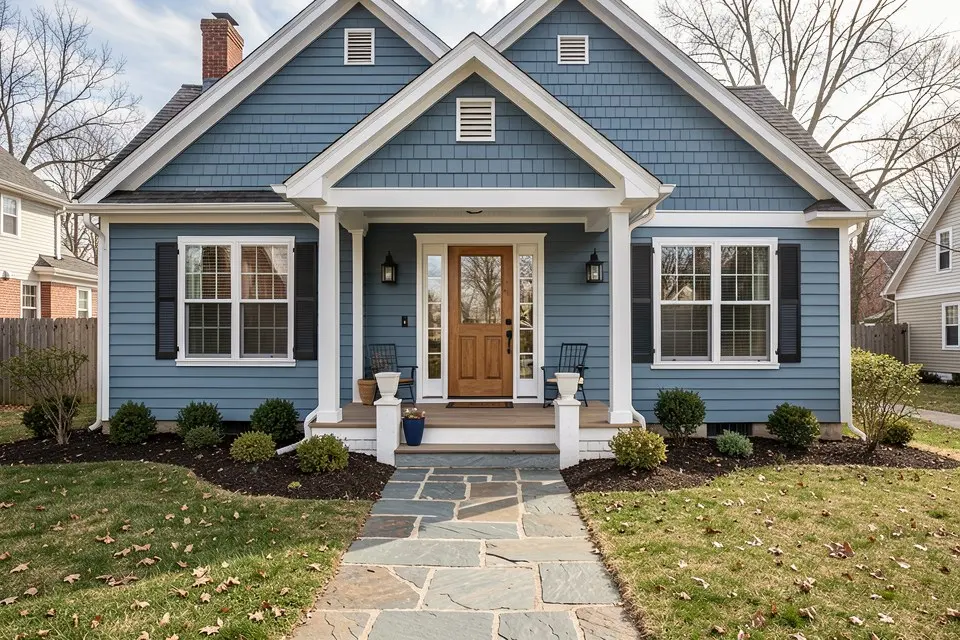
AI exterior home design lets you see a new facade on a photo of your own house before you pay a painter, a roofer or a garden designer. You upload one picture, describe the change, and get back the same house with new paint, siding, windows, roof colour, front door or landscaping — same shape, same perspective, new materials. A professional repaint of an average house costs €3,000 – €8,000; ten minutes comparing schemes first is cheap insurance.
What it can and can’t change
| Works well | Works less well |
|---|---|
| Facade paint and render colours | Exact paint matches (always test a real sample) |
| Siding, cladding and brick colour | Structural changes: extensions, new floors |
| Window frames, shutters, front door | Precise dimensions of new elements |
| Roof colour and material | Tight streets with heavy perspective distortion |
| Front garden, paths, planting, fencing | Night shots |
The model is instructed to keep the building’s structure and perspective, so it’s a tool for choosing finishes, not for planning a loft conversion.
Step by step
- Take the photo. Landscape, from across the street, straight at the facade, on a bright overcast day. Get the whole house and a strip of ground in frame; move bins and cars if you can. How to take photos for AI redesign has more framing tips.
- Open Exterior Redesign and upload it — or start straight in the app.
- Describe one direction at a time. “Warm white render, anthracite windows, natural oak door, gravel front garden with grasses” works better than a list of ten options. Name colours by family and undertone rather than brand names.
- Generate three schemes — a safe neutral, a darker contemporary one and a warmer traditional one — and compare them side by side.
- Shortlist, then test for real. Paint a 1 m² sample on the sunniest and the shadiest wall, and look at it morning and evening before you order.
Prompts that work, by element
- Paint and render: pair a main colour with a trim colour and a door colour. The three-colour rule and undertones are in how to choose exterior paint colours; check the light reflectance too — what LRV is explains why dark colours on cladding need care.
- Siding and cladding: name the material and direction, e.g. “vertical charred timber cladding on the upper floor”. The siding ideas guide lists options with prices.
- Roof: “dark grey slate” or “terracotta clay tiles”; the roof is 30 – 50 percent of what you see, so test it with the walls, as in the roof colour guide.
- Front door: the cheapest change with the biggest effect — front door colour ideas has combinations that work.
- Front garden: “low-maintenance front garden, gravel, lavender, a straight stone path”; see front yard landscaping ideas and, for the back, what a garden redesign costs.
Selling? Show the potential
A tired facade is the first photo buyers see. An exterior redesign shows what a weekend of paint and planting would do, and curb appeal ideas ranks those changes by return. If you use the image in a listing, label it as an AI visualization and keep the real photo first. With Homie Pro you can also turn the before and after into a short reveal video — see how to make a before and after room video.
Mistakes to avoid
- Choosing from the screen alone. Monitors oversaturate; real render in daylight is lighter and greyer. Always sample.
- Ignoring the neighbours. The scheme has to sit next to the houses either side — include some of them in the photo.
- Changing everything at once. Walls, roof, windows and door in four new colours rarely works. Change two elements, keep two.
- Forgetting the rules. Conservation areas and some housing associations restrict facade colours; check before you fall for one.

 Homie
Homie